Showing posts with label how to. Show all posts

How to fix Winrar corrupted files

You downloaded all the files and now WinRar says that the files are corrupted and / or wrong password error.

How to solve this?

First you must know exactly which file(s) is / are corrupted. When WinRar gives back the error it says which file(s) is / are corrupted. But to be sure, open each file at a time. When opening each file, if the file is corrupt winrar will give an error immediately.

Now you know which file(s) is / are corrupted

There are 2 Methods to solve this:

Method 1:

Open the corrupted part, and press “ALT + R”

When all went well, the file will be ok.


Alternative Method 1:

Step 1: Open Winrar and navigate to the folder containing the *.rar files. If you open the first file you can navigate to the folder using the up button.
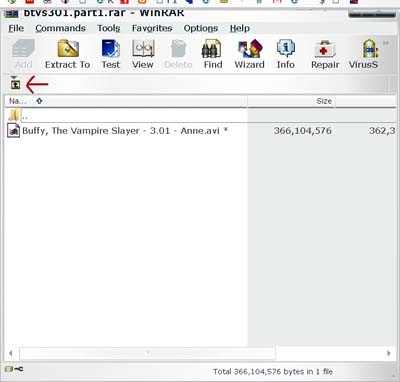
How to fix Winrar corrupted files


Step 2: Highlight / select all of the files associated with the archive and click the repair button. This will take some time.

How to fix Winrar corrupted files


Step 3: Use the repaired files to extract the previously corrupted content. The files will have the prefix “rebuilt.” added to them.
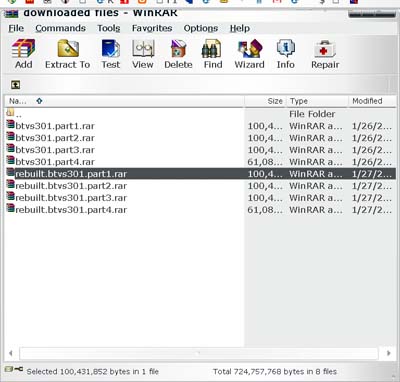
How to fix Winrar corrupted files

Note: Most of the time there are only 1 or 2 corrupted files and there is no need to repair the ones that are OK. To do this, you must know which files are bad and select those files and repair them. Once repaired, delete the original files and remove the “rebuilt.” prefix from the repaired files. Finaly, extract as usual.

If Method 1 does not work please try Method 2.


Method 2:

Step 1: Download the file or files that are corrupted again.

Step 2: Extract using WINRAR. Problem should be solved.

What if these methods did not work:

If you downloaded the file again and it’s still corrupted, make sure your downloads are 100% downloaded. Sometimes the download ends abruptly near the end. Check file size. Usually only the last file has a different size, all others should have the same size. Compare the file sizes to see if the problem is from the download or if it really is the file that’s corrupted.


How to split a file with HJSplit

How to split a file

After clicking on the 'Split' button in the main HJSplit window, you will see the following screen:

How to join files with HJSplit

How to join a file
 
With HJSplit you can not only split files, but also join the split parts back together again. 
Information: a collection of split parts is set of files having all the same filename, exept for the extension at the end of the file name (.001, .002, .003, etc.) . Combining/joining these split parts is equivalent to restoring the original (pre-split) file.
After clicking on the 'Join' button in the main HJSplit screen, you will see the following screen:


How to download with FILESERVE?

It's so easy to download with Fileserve, though there are some limitations if your a Free User.

1. Open the link you wan't to download (ex. i want to download an album name [va] Kung Fu Pand - OST)


2. Wait for the AdF.ly and Linkbucks to load then click in the right above corner


3. Now the Fileserve Link will open and you'll see..


4. Scroll this page down, and you'll see 2 button. A Premium button and a Free User option.

Now click the SLOWER DOWNLOAD button in the right side


5. Once clicked, you'll be given a captcha. (see pix below)

Now write the exact given captcha in the blank space provided just above "Enter the code shown above". In this example, it is   thannex 108   then click again SLOWER DOWNLOAD

5. Another page will open, wait for the countdown (see pix below)


6. Then after the countdown you'll DOWNLOAD LINK will open.

Finally! Just click the SLOWER DOWNLOAD button to download. Don't click the Blue Button. It's only intended for Premium User. You may also buy a Premium Account so you can download more than 1 file at the same time.

now go back to DIRECTDL  |  STRICTLY MOVIES  |  PRONFLIX  just click it